The Focus Room
PED Planner
Plan. Execute. Dominate.
A structured weekly planning system that turns your priorities into a plan. Protect your non-negotiables, make space for the work, and see what you actually accomplish.
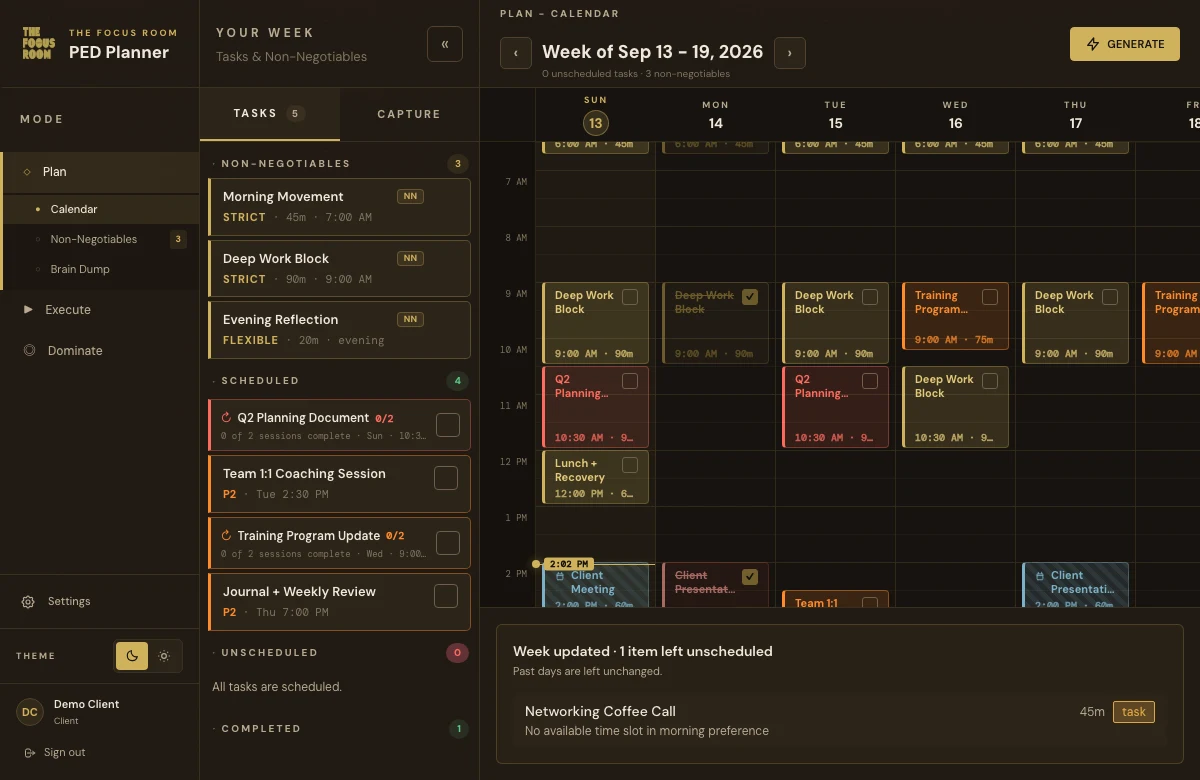
Make room for what matters.
A silent recording navigating the PED calendar, Brain Dump, Execute, and Dominate with sample tasks.What PED does
Even the greatest plan needs structure.
This is the structure.

Schedule your week around your non-negotiables
Protect the commitments that matter. PED schedules your recurring non-negotiables before the rest of your tasks.
Brain dump your tasks, then build your week
Capture the work and set priorities. Generate a schedule that fits around your available time and existing commitments.
Track completion as you go
Mark work done or skipped, add notes, and log your actual time. Adjust your PED tasks when the week changes.
Bring Google Calendar into the plan
Optionally sync the calendars you choose. Existing events stay read-only while PED plans around them.
Review your Domination Score
See the share of scheduled PED blocks you completed, and use your weekly review to improve the next plan.
A plan you can put into practice.
Explore the appPlan. On purpose.
Give your priorities a place.
Start with what matters. Protect your non-negotiables, capture the work, and turn the list into time on your calendar.
Try it: generate this sample day.
Make your next week intentional.
Membership includes the planner and resources to learn the PED system.
$15 / month
Request AccessQuestions before you start
All questionsAccess & membership
How do I get access?
PED Planner currently uses invitations. Request access and The Focus Room team will review your request before sending an invitation.
What’s included with membership?
Access to PED Planner and resources to learn the Plan, Execute, Dominate system.
Can I pay online yet?
Online checkout is coming soon. No payments are collected on this website yet. Existing members can continue to sign in, and new members can request access.
Your calendar
Do I need Google Calendar?
No. Connecting Google Calendar is optional. You can capture tasks, set non-negotiables, and plan your week without it.
Does PED edit Google Calendar?
No. The connection is read-only. Your selected Google Calendar events appear as locked blocks so PED can plan around them. PED does not create, edit, share, or delete Google Calendar events.
Can I disconnect my calendar?
Yes. Disconnect from Settings to remove stored OAuth credentials and stop future sync. You also control which calendars are included.
Ready to plan your week?
Built from Jarred Curcio’s coaching practice at The Focus Room.
The story behind PEDAlready a member?Sign In